Every pane on every Mac, in one list.
Panes are grouped by Mac and project, and the one that needs you comes first. Each pane writes its own title from the conversation, so you can tell your six Claudes apart.
needs youdoneworkingidle
Watch one ask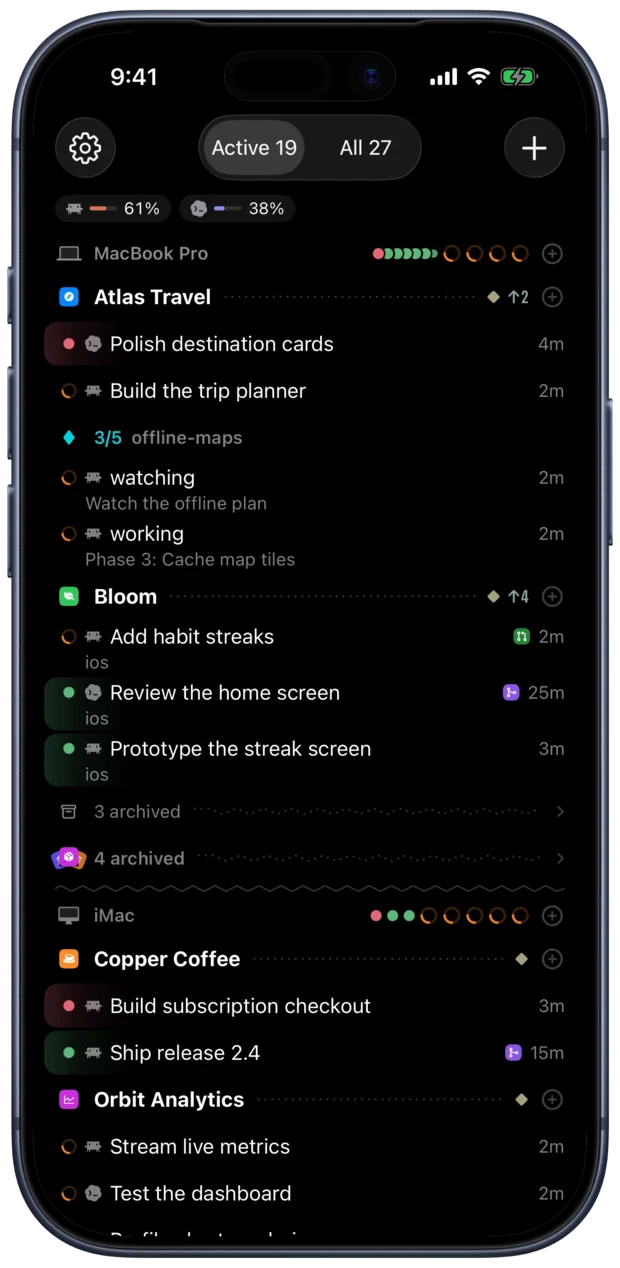
Coming soon for iPhone, iPad and Mac. Free, with no account.
Claude Code, Codex and the rest in one list, sorted by who needs you. Switch projects in a tap and answer from the Lock Screen.
Not here? An agent that reports to herdr shows up under its own name.
Filmed in the app’s demo mode, with the waits cut. Pick a demo, or let them play.Swipe through the demos, or let them play.

Pull the sidebar out over the pane and slide down to the agent you want. Let go and you're in its pane with the keyboard still up, ready for the next prompt.
The agent that needs you lights up and carries its project to the top of the list, above the ones still at work. Tap it and the question is waiting in its pane.
A Live Activity shows who’s working and who’s waiting on every Mac, and a question brings its answers as buttons. Composed from the widget’s own views, on a stand-in Lock Screen.
Each Mac keeps one live connection, so switching panes never waits for a new SSH handshake.
The Mac app has the same sidebar, with every agent on every Mac, and room to work: panes open side by side. Shown at double speed.
Forget a key? Hold ⌘ and they’re all there. ⌘E goes to the next pane needing you, and ⌘K finds any pane on any Mac from a word or two. Your hands stay on the keys.
On iPad the list holds more of your agents at once, and a pane has the width to show a diff without wrapping. It’s the same app, with more room.
The ⌘K switcher searches every pane, project and past prompt across your Macs, and brings closed sessions back. On a phone, hold the status row or open the sidebar. It starts on who’s waiting for you.
A warm prompt cache makes the next message cheap. Once it expires, that message pays for the whole conversation again. For Claude Code and Copilot, which say when theirs runs out, the dial and the message bar cool with it, on iPhone and Mac. The clock’s sped up here.
Queue a message for when the agent is done, or for tomorrow at 9. Type / for the agent’s commands and skills. Drafts are saved per pane, even if you close the app.
Tap the mic and say it. Stop, start the next take straight away, and your words land in the order you said them. Recognition runs on your device, or on Groq with your own key. Filmed with scripted takes, since a simulator has no microphone.
Attach a screenshot or a photo and it goes straight to your Mac. Claude Code, Codex and the other agents that read images get it as an image, and the rest get its path. The agent’s replies are scripted here.
Each pane’s bar shows its branch and its pull request’s badge in GitHub colors. Tap the bar for the rest: what’s uncommitted, how far it’s ahead or behind, and a link to the PR.
When an agent prints a file path, tap it. HTML runs, and Markdown, PDFs and images open, all fetched from the Mac.
Tap a suggested command to review it, then choose Run in New Terminal. A shell opens in the pane’s folder, with the output right there. Tap Done to return to the agent; the shell keeps running on your Mac.
A composer that sends multi-line prompts as one paste. On-device dictation. Slash-command suggestions. A key bar with Esc, Ctrl and arrows, and a double tap on the pane for Tab. Photos and files go straight to the Mac.
When a conversation stops on a temporary error, like a server error mid-response, your Macs type “resume” into it for you.
Your agents run on your Mac, in herdr, the open-source runtime that keeps their terminals alive. Hako puts them on your phone.
Hako for Mac installs its bridge and herdr in your user account, with no administrator password. Already run herdr? Your panes stay as they are.
Tailscale connects your phone to your Macs from anywhere, on the same Tailscale account. iCloud Keychain tells it which Macs are yours. Without it, pair with a QR code.
Your Macs pair on their own, with every pane on them in one list. Allow notifications, and agents can ask you from the Lock Screen.
Every pane has a native home, across all your Macs. See who’s working, who’s done and who needs an answer, then jump straight into the conversation. Swipe through all ten, or tap a name.
Panes are grouped by Mac and project, and the one that needs you comes first. Each pane writes its own title from the conversation, so you can tell your six Claudes apart.
Long-press an agent’s alert to read the question, which pane asked and on which Mac. Tap an answer, or Open to jump to the pane.
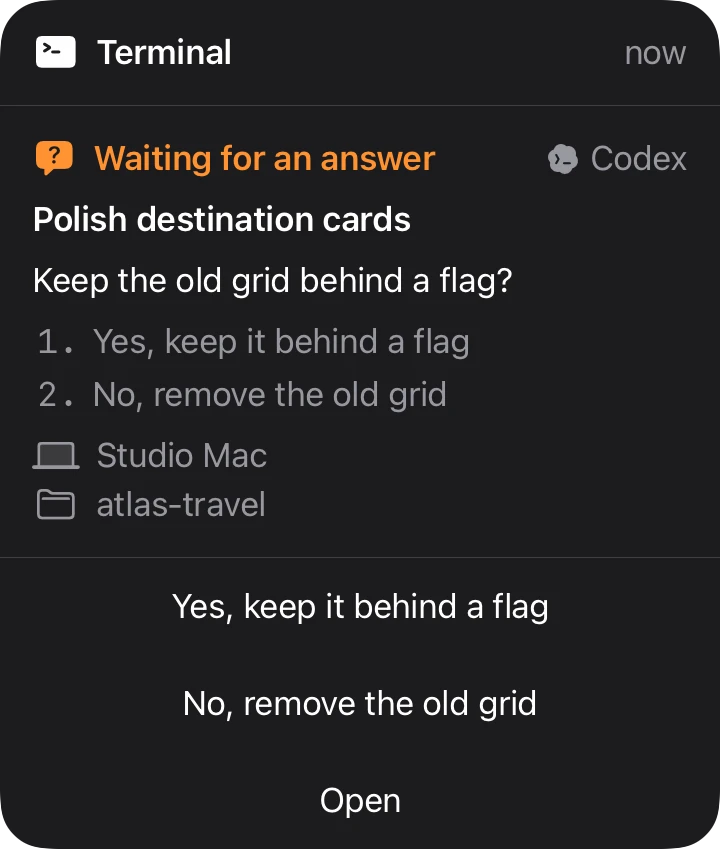
A Live Activity and the Dynamic Island show who is working and who is waiting on every Mac, with answer buttons right there.
Watch an answerMacs on your iCloud account and Tailscale network pair automatically, with no QR code.
With Handoff, the pane you’re looking at opens on your iPhone, iPad or Mac, draft included. On iPhone, open the App Switcher and tap the Hako banner at the bottom.
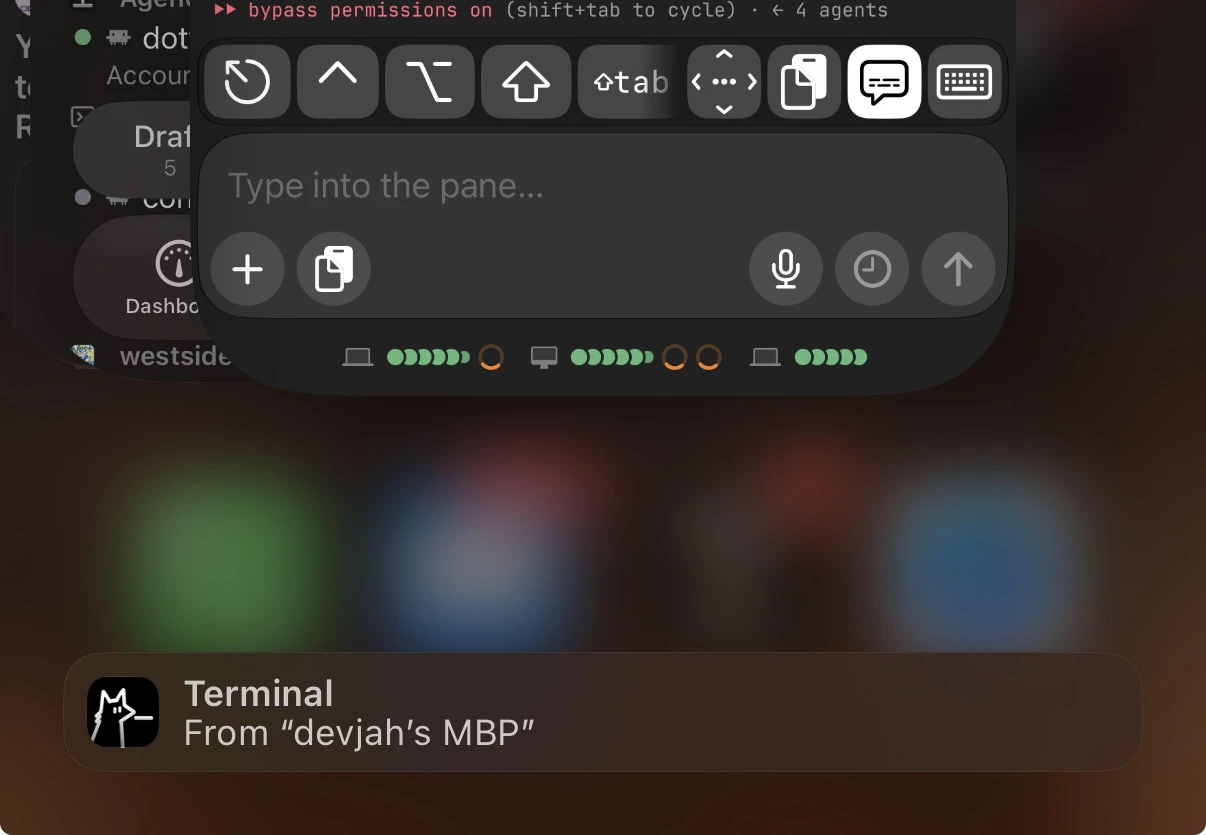
Closing a pane waits 30 seconds, with a countdown and an Undo button, so a mis-tap never ends an agent’s session.

Your terminal, your way. Compare fonts, context readouts and the typing HUD directly in the pane.
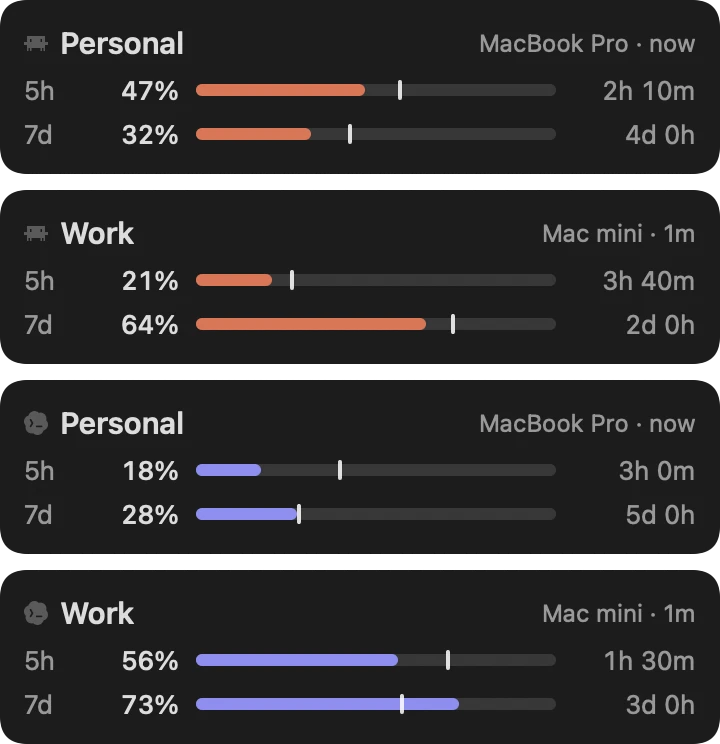
Each Claude and Codex account shows how much of its 5-hour and weekly window is used, and when it resets. Name your accounts to tell them apart.
As an agent’s prompt cache runs out, its message bar frosts over. Type to a cold one and Hako says what sending will cost, before you’ve spent a thing.
Watch it go coldCold: the next message pays for all 148k of context again
Connect to any Mac or Linux box. Mosh is tried first, so a session stays alive through tunnels, network switches and sleep.
Hako talks to your Macs directly, with no account and no server of ours between you and your panes.
See what leaves your devices →Hako started on my paternity leave. Most of my work then happened on my phone, with agents running on the Macs at home.
Doing the groceries, I improved Hako. At the gym, I improved Hako. Most of it was built that way: from inside Hako, wherever I happened to be.
The short version of what Hako needs and what it costs.
Nothing. Hako is free, with no account to make. herdr is open source, and Tailscale’s Personal plan is free for non-commercial use. Your agents cost what they cost you today.
Any agent you run in a herdr pane on your Mac. Hako knows 24 of them by name: Claude Code, Codex, Gemini, Cursor and the rest.
It works the same. Every agent on that Mac sits in one list, sorted by who needs you, and can ask you from the Lock Screen. Switching projects takes a tap, and a second Mac joins the list once you set it up.
An SSH app is built around hosts and sessions. Hako is built around your agents: every agent on every Mac in one native list, sorted by who needs you, with answers from the Lock Screen. Plain SSH and Mosh are there too.
No. Panes go straight from your phone to your Mac over Tailscale or SSH, and notifications are encrypted on your Mac before they reach the relay. There’s no account to tie anything to. See what leaves your devices.
herdr is the open-source runtime your agents live on: it keeps their terminals running on your Mac and marks each pane working, blocked or idle. Hako for Mac installs it for you, in your user account. Already run herdr? Your panes stay as they are. Without it, Hako is still a plain SSH and Mosh terminal for any Mac or Linux box.
Tailscale is how your phone reaches your Macs, at home or away. With iCloud Keychain on as well, your Macs pair on their own. Without iCloud Keychain, pair with a QR code from the Mac.
Yes. Your agents run on your Mac, so it has to be awake for them to work and for Hako to reach them. Turn on Warn when a Mac goes offline, and a Live Activity shows you when one drops off.
A Mac with macOS 15 or later, on Apple silicon or Intel, and an iPhone or iPad with iOS 17 or later.
Not yet. Hako is for iPhone, iPad and Mac. A Linux box connects over SSH or Mosh, as a plain terminal.
Soon, on the App Store. Leave your email below and you’ll hear once, when it’s out.
Coming soon for iPhone, iPad and Mac. Free, with no account. Leave your email and hear when it’s out.


